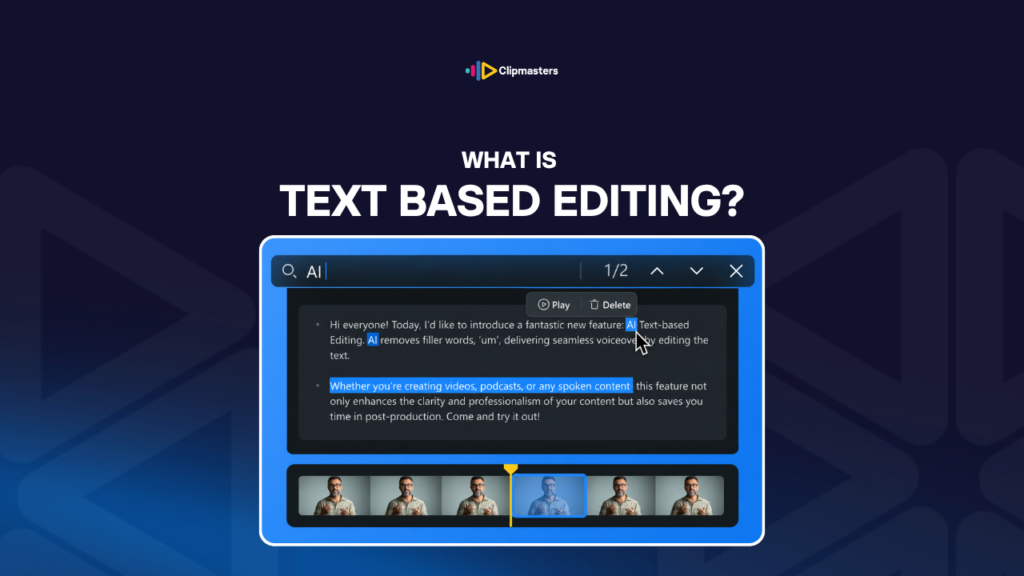
Text-based editing is a way of cutting video by working with the words, not the clips.
The software listens to your video and writes out a transcript. From there, you edit the text like a document. When you delete a sentence from the transcript, the matching piece of video disappears too.
Here is the basic flow:
The main tools for this in 2026:
What text-based editing is good at:
Where it falls short:
For commercial work, text-based editing shines on interviews, podcasts, and other talking-heavy content. For everything else, the timeline usually still wins.
Here are the reasons text-based editing has caught on.
Speed for talking content. Editing an interview-heavy piece can be 5 to 10 times faster this way.
Less mental effort. Reading and trimming text is often easier than watching the same clip over and over.
Easy searching. You can jump to any quote or moment by typing a word.
Captions come along. The transcript gives you captions almost for free.
A built-in record. That transcript also documents the content for later.
Gentler learning curve. It takes less specialist skill than timeline editing.
Easier teamwork. People who aren’t editors can pitch in on a text edit more easily.
A modern trend. More and more teams use this approach for the content that suits it.
For commercial work, text-based editing has real strengths for the right content. It’s just limited for other types.
Here’s how it works in practice.
Pick the right content. Interviews and other dialogue-driven videos benefit most.
Choose a tool. Descript, Premiere Pro, and DaVinci Resolve all support it to some degree.
Make the transcript. The software does this for you. Read it through and fix any errors.
Edit the text. Delete what you don’t want, and rearrange if you need to.
Move to the timeline for polish. Most editors then go back to the timeline for B-roll, music, color, and audio.
Combine the two. Text-based for the rough structure, timeline for the fine work.
Watch the final cut. Play it through to catch anything off.
In most commercial workflows, text-based editing handles the first rough pass while the timeline handles the polish.
A few things worth keeping in mind.
Transcripts vary in quality. AI transcription keeps improving, but it isn’t perfect. Read it over and fix mistakes.
Match it to the content. It helps with talking videos. It does little for action.
Mix it with timeline editing. The best results usually come from using both.
Most tools are subscriptions. You’ll pay monthly for the main ones.
It’s a new way of working. Expect a short adjustment if you’re used to the timeline.
Mind your privacy. Some tools send audio to the cloud. Sensitive content may need to stay local.
For commercial work, text-based editing is one tool among many. Good teams use it where it fits.
Text-based editing has become a real time-saver, especially for talking-heavy videos. When your project is an interview, a podcast, or an explainer, your Clipmasters editor can use this workflow to move much faster, then switch to the timeline for the polish. You get the speed where it helps and the precision where it matters, all as part of the same edit.
For talking-heavy content, it's faster. For other content like action, music videos, or abstract pieces, the timeline usually works better. They're different tools for different jobs.
Usually 85 to 95 percent for clean audio in standard English. It's lower for accents, technical jargon, several people talking at once, or noisy audio. Always read it over and fix it before you rely on it for cutting.
More and more, yes. Modern text-based tools handle a lot of the work now. For real polish like color grading, complex audio, or fancy graphics, most editors still head back to timeline software.
For talking-heavy content, it's well worth it. The speed savings are real. If you never work with dialogue, it's less essential, and sticking to your specialty still makes sense.
Descript leads the dedicated text-based space. Adobe Premiere Pro and DaVinci Resolve are adding strong features too. The best one depends on your wider workflow, and many editors use more than one.