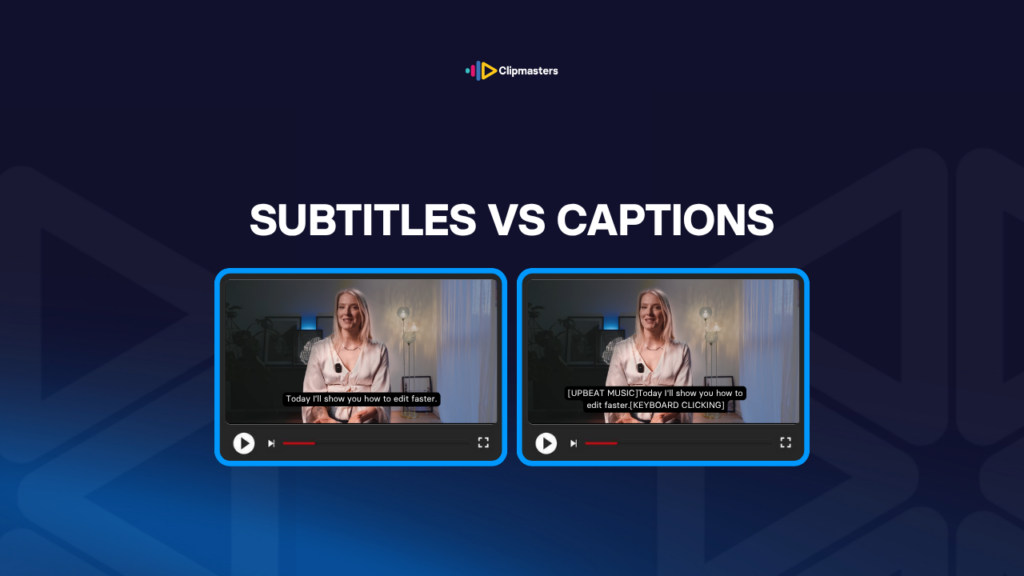
People often use “subtitles” and “captions” to mean the same thing. They are not. They do different jobs and follow different rules.
Subtitles are for viewers who can hear the audio.
Captions, and closed captions in particular, are for viewers who cannot hear the audio.
This difference matters in the eyes of the law in some places. The US has accessibility rules (ADA and FCC rules) that require captions for certain content. The EU has similar laws. Subtitles do not meet these requirements. Captions do.
Two more terms are worth knowing.
So for most commercial video, the simple version is this.
In everyday use, people are loose with these words. Plenty of platforms call something “subtitles” when it is really a caption. The thing that actually matters for any project is what the text includes and what the platform expects.
Here are the main reasons subtitles and captions matter in video work.
Accessibility is often required by law. US public-facing video, broadcast TV, and many online platforms have rules that require closed captions. Skipping them can lead to compliance problems and even lawsuits.
Most people watch with the sound off. On TikTok, Instagram, Facebook, and LinkedIn, most viewers keep the sound muted. Captions or subtitles on screen make a big difference in how many people keep watching.
They reach more people. Translated subtitles open your video to a much bigger audience. The same English video with Spanish, French, German, and Japanese subtitles reaches far more people than English alone.
They help people find your video. Caption files hold the full transcript, and platforms like YouTube use that text for search and recommendations. Videos with captions are easier to find.
They help people understand. Even people watching in their own language often turn captions on. Studies keep showing that captioned video is easier to follow and remember.
They can help your reach on some platforms. TikTok, LinkedIn, and others tend to favor videos with captions, since those videos hold attention better. So captions can quietly help your video get shown to more people.
They give you a searchable record. A captioned video can be searched by what was said. The transcript becomes a record, which is handy for documentation, repurposing content, and compliance.
They look professional. Captioned video shows care and attention to every viewer. Video without captions sends the opposite signal.
For commercial work, captions or subtitles are now expected on almost every social and online video. They cost little and give a lot. Leaving them off is becoming rare.
For broadcast and streaming delivery, the platform usually requires captions. The exact format (SCC, CEA-608, CEA-708, TTML, WebVTT, SRT) depends on where the video is going.
Here is how subtitles and captions usually get added to a video.
Start with auto-transcription. Tools like YouTube auto-captions, Adobe’s built-in transcription, Rev.ai, Otter.ai, and Descript turn the audio into a first-draft transcript. For clean audio in standard English, this is usually 85 to 95 percent right. It drops for strong accents, technical terms, or noisy audio.
Clean it up by hand. Someone reviews the draft and fixes the errors. Names, technical words, and tricky sections almost always need manual fixes. For top-quality work, a human may transcribe the whole thing from scratch.
Get the timing right. Each line is timed to appear and disappear in step with the audio. Auto-timing is usually close, but it often needs small tweaks. A line normally shows up 1 to 2 seconds before the audio and stays 1 to 2 seconds after.
Add non-speech notes (for captions). This means sound effects in brackets ([door slams], [music swells], [phone ringing]), speaker labels (JOHN:, NARRATOR:), and other sounds. Subtitles skip this. Captions include all of it.
Check the format. Caption files have rules: a limit on characters per line (usually 32 to 42), a limit on lines on screen (usually 2 to 3), a minimum time each line shows (usually 1 to 2 seconds), and a top reading speed (usually 160 to 180 words per minute).
Export in the right file type. SRT for general use, WebVTT for the web, TTML for streaming, SCC or CEA-608/708 for broadcast, and MCC for some Apple workflows. Each platform wants its own format.
Burn in or attach. Some platforms want burned-in captions, baked into the picture (TikTok historically, and Instagram for some content). Others support toggleable captions (YouTube, Netflix), which are delivered as a separate file.
Translate (for more than one language). Translated subtitles add a translation step on top of the transcript. For commercial work, a human translator beats machine translation, especially for marketing copy where tone matters.
For most commercial work, captions and subtitles add 1 to 3 hours of work per finished hour of video. Burned-in captions add a re-render at the end. Toggleable captions add a separate file to deliver.
Here are the slip-ups that make caption work look unfinished.
Leaving auto-captions as-is. Auto-transcription is 85 to 95 percent right, and the leftover errors stand out. Names, technical terms, and odd words are the ones most likely to be wrong.
Using the wrong format. Sending SRT when the platform wants TTML. Sending closed captions when the platform wants burned-in. Check what the platform needs before you export.
Going by too fast. Captions that flash past faster than people can read them. The usual top speed is about 160 to 180 words per minute. Faster than that, viewers can’t keep up.
Bad line breaks. Captions that wrap in awkward ways, with a single word stranded on its own line. Most caption rules cap a line at 32 to 42 characters.
Bad placement. Captions sitting over faces, on-screen text, or other key visuals. They usually go at the bottom, but you can move them when they cover something important.
Style that keeps changing. Caption font, size, color, or look that shifts partway through. Keeping it the same the whole way through looks professional.
Burned-in captions made for the wrong shape. Captions placed for a 16:9 cut that get cut off in a 9:16 version, or the other way around. Each shape needs its own caption placement.
Calling subtitles captions, or the reverse. Translated dialogue with no sound notes is a subtitle, not a caption. The label matters for accessibility rules.
Posting on social with no burned-in captions. Social posts without captions miss most viewers. Even when the platform offers auto-captions, the quality is uneven and you have no control over it.
Skipping speaker labels. When several people talk, viewers get lost without a clear note of who is speaking. Add labels (JOHN:, MARY:) or use placement to show it.
Leaving non-speech sounds out of captions. Real closed captions include things like [music], [door slams], and [laughter]. Without them, deaf and hard-of-hearing viewers miss part of the story.
For commercial work, captions and subtitles are now expected, not an optional finishing touch. They cost little next to what you gain in reach, accessibility, and platform performance.
At Clipmasters, captions are just part of the edit, not an extra. Your dedicated editor knows your brand, so the look and placement match the rest of your video. With AI-assisted transcription doing the first pass and a person cleaning it up, simple caption work can be back to you in as little as 24 hours.
For some content in some places, yes. US public-facing video, broadcast TV, government communications, and some commercial content have accessibility rules that require captions. The exact rules depend on the content type and platform. For commercial social media, captions are usually not required by law, but they are now an industry standard.
It depends on the platform. For TikTok, Reels, and Stories, where caption support can be hit or miss, burned-in captions are usually the safer bet. For YouTube, LinkedIn long-form, and most streaming, toggleable closed captions work better because viewers can turn them off. Many editors do both: burned-in for social shorts, closed captions for long-form.
Modern auto-captioning (YouTube, Adobe, Descript, Rev) is usually 85 to 95 percent accurate for clean audio in standard English. It gets less accurate with strong accents, technical terms, people talking over each other, and noisy audio. Auto-captions make a good first draft, but they need a human to review and fix them for professional work.
YouTube accepts several caption formats, including SRT (.srt), WebVTT (.vtt), SCC (.scc), TTML (.ttml), and a few others. SRT is the simplest and most common. YouTube also has built-in auto-captions, but the quality varies, so editing them is common.
For a 1-hour video with clean audio, plan on 2 to 3 hours of work for high-quality captions: 30 to 60 minutes for auto-transcription and review, 30 to 60 minutes for timing, and 30 to 60 minutes for adding sound notes and formatting. Professional captioning services can often turn most content around same-day or next-day.