Pan Shot

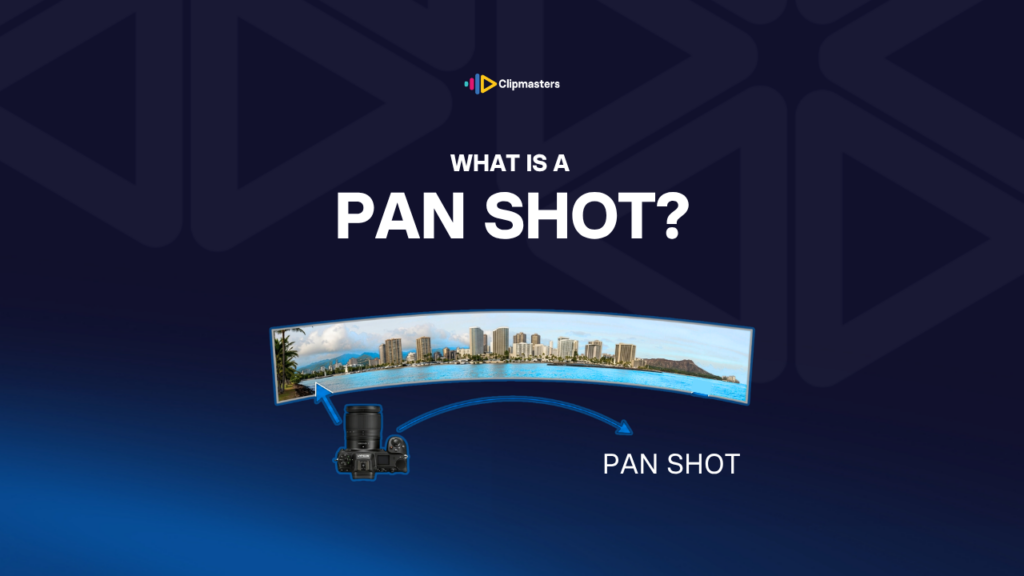
A pan shot rotates the camera horizontally on its axis, sweeping the view from side to side while the camera stays in place.

In this article

Related Terms

Start Video editing now

What is a Pan Shot?

A pan is one of the simplest camera moves. The camera stays in one spot and pivots left or right on its axis. The view sweeps across the scene, just like turning your head to look across a room.

The word “pan” comes from “panorama,” which means a wide view of a scene. The move itself goes all the way back to the earliest days of cinema, when filmmakers found that turning the camera showed more of a scene than a fixed shot.

A few related moves often get mixed up with panning:

  • Tilt. The camera pivots up and down instead of side to side.
  • Tracking shot. The camera actually travels through space, going left, right, or alongside a subject, rather than pivoting in place.
  • Dolly shot. The camera moves toward or away from the subject.
  • Crane shot. The camera moves up or down through space.
  • Whip pan. A very fast pan, often used as a transition.

The thing that makes a pan a pan: the camera does not travel through space. It rotates on its axis. That gives it a distinct look, where the view changes but the camera position stays put, which is different from any move where the camera physically travels.

There are a few specific kinds of pan:

  • Slow pan. A gradual, controlled sweep. Often used for mood shots or to follow slow action.
  • Whip pan. A fast, almost blurred pan, used as a transition or for a burst of energy.
  • Sweep pan. A pan that follows a clear line, like a wide landscape or a row of people.
  • Snap pan. A quick, controlled pan over to a new subject.
  • Pan and hold. A pan that stops on a subject and holds there.

For commercial and online video, pans are common but should have a point. A pan with no clear destination feels aimless. A pan that reveals something new or follows a subject feels deliberate.

Need editors who handle camera moves with intent?

Editors matched to your brand. Turnaround in as little as 24 hours.

What pans do visually

Pans do a handful of specific jobs in storytelling.

  • They reveal something. A pan can bring something into view that was hidden at the start of the shot. A subject moves in, a new location appears, or a surprise enters the frame.
  • They follow action. When a subject moves sideways across the scene, a pan can follow them without cutting to a new shot.
  • They set up a scene. A slow pan across a landscape or a busy space shows the viewer where the action is and how big the place is.
  • They connect things. A pan from one element to another shows that the two are linked, tying them together visually.
  • They build anticipation. A slow pan toward something unseen creates suspense. The viewer knows the camera is heading somewhere and waits to see what is there.
  • They add rhythm. A pan brings movement to an otherwise still shot. In a video full of locked-off shots, an occasional pan breaks things up.

For commercial work, pans show up in:

  • Establishing shots that introduce a location.
  • Product reveals where the camera pans across a product line.
  • Transitions between scenes, especially whip pans that work like a cut.
  • Documentary, for following action that does not need a full tracking shot.
  • Slow brand films, where calm pans set the tone.

Pans work best when they have a clear job. A pan just to “show more of the scene,” with no real point of interest, tends to drag. A pan that lands on something specific, like a face, a product, or a bit of action, feels intentional.

Pan shot vs tracking shot: the difference

Here is the key difference in camera-move vocabulary: a pan does not move through space, but a tracking shot does.

A pan keeps the camera in one spot and pivots it left or right. The view changes, but the camera does not travel. People on either side briefly fill the frame as the camera turns past them, but the actual distance between the camera and the subjects never changes.

A tracking shot moves the camera through space, going left, right, or alongside a subject. The camera’s position changes, so the way it relates to the subjects shifts as it passes them.

The two create different feels.

A pan flattens the scene. Since the camera is not moving through space, the foreground and background do not shift against each other, so the eye reads less depth.

A tracking shot creates depth. Since the camera moves through space, foreground objects shift against the background, an effect called parallax, and the eye reads more three-dimensional space.

Here is a simple example: filming a row of people standing still.

  • A pan from one end of the row to the other sweeps the camera across them. Each person briefly fills the frame as the camera turns past. It feels like you are standing still and turning your head.
  • A tracking shot alongside the row moves the camera physically past them. Each person gets closer, then farther, as the camera passes. It feels like you are walking past them.

For commercial and online video, both are useful. Pans are easier and need less gear, since a good tripod with a fluid head is enough. Tracking shots need more gear, like a slider, a dolly, a gimbal, or a drone, but they look more cinematic when motion is the point.

How to execute a pan well

A few practical tips for getting pans right.

  • Use a fluid head. A pan on a video tripod with a fluid head is smooth and easy to control. The same pan on a photo tripod with a ball head, or done handheld, is rarely smooth enough for professional work.
  • Set the drag. Fluid heads have an adjustable resistance setting. More drag gives slower, steadier pans. Less drag lets you move faster. Set it for the speed you want.
  • Start and end on a hold. A pan that starts from a stop, moves through the sweep, and ends on a stop feels far more deliberate than one that is always in motion. Hold the start for two to three seconds, pan smoothly, then hold the end for two to three seconds.
  • Pan at a comfortable speed. Too slow feels sluggish. Too fast makes the video judder, especially below 60fps. A rough rule: a pan across a 16:9 frame should take four to six seconds for a smooth result at 24 to 30fps. Going faster needs a higher frame rate.
  • Match shutter speed to frame rate. Pans look smoother when your shutter speed is about one over twice the frame rate. So 24fps wants 1/50s, 30fps wants 1/60s, and 60fps wants 1/120s. A much faster shutter makes the motion look choppy.
  • Avoid the shakes. Wind, a vibrating floor, or an accidental bump all show up. Pans make small camera movements worse, so a stable mount and a calm spot matter more here than for still shots.
  • Plan your end point. A pan that lands on a specific subject feels intentional. A pan that drifts off into nothing feels aimless. Decide before the take where the pan should stop.

For run-and-gun work, where everything has to be fast, a clean pan is a sign of a skilled camera operator. The same pan done sloppily looks amateur. The move is simple in theory, but it takes care to pull off well.

How Clipmasters Uses This

With a pan, the gap between professional and amateur shows up right away: a controlled pan with clean start and stop holds reads as deliberate, while an unsteady or aimless one just reads as random camera movement. A good editor knows to use pans sparingly, and only when they reveal something, follow action, or set up a scene. At Clipmasters, your editor makes that call as a normal part of the edit, and will happily keep a strong static shot over an aimless pan.

Frequently asked questions

What's the difference between a pan and a tilt?

A pan rotates the camera left and right. A tilt rotates it up and down. Both keep the camera in one spot while the view changes. Pans sweep across a horizontal scene, while tilts reveal vertical ones, like a tall building from the ground up. Both are pivoting moves, not actual travel through space.

How is a pan different from a tracking shot?

A pan keeps the camera in one spot and turns it. A tracking shot physically moves the camera through space. The pan changes the view by turning, while the tracking shot changes it by traveling. Tracking shots have parallax, where the foreground and background shift against each other, because the camera is moving. Pans do not, because the camera stays put.

What's a whip pan?

A whip pan is a very fast pan, sometimes used as a transition between shots. The image blurs during the move because of the speed. A whip pan can connect two scenes: the camera whips to the right, then a new scene picks up the motion. Edgar Wright's films use whip pans heavily as a signature move.

How do I make a smooth pan?

Use a fluid head on a video tripod. Adjust the drag for steady resistance. Start and end on a hold: do not move straight into the pan, but hold the starting position for two to three seconds first, then begin. Pan slowly enough that it does not judder at your frame rate. Match your shutter speed to that frame rate, like 1/50s for 24fps or 1/60s for 30fps. And keep wind, vibration, and bumps out of it.

When should I use a pan vs a cut?

A pan works when you want the viewer to feel that two elements are connected. The pan shows that A and B share the same space and belong together. A cut between A and B does not show that link. Cuts are faster and more efficient for most situations, so save pans for the moments when the connection between two things really matters.

Loading video…