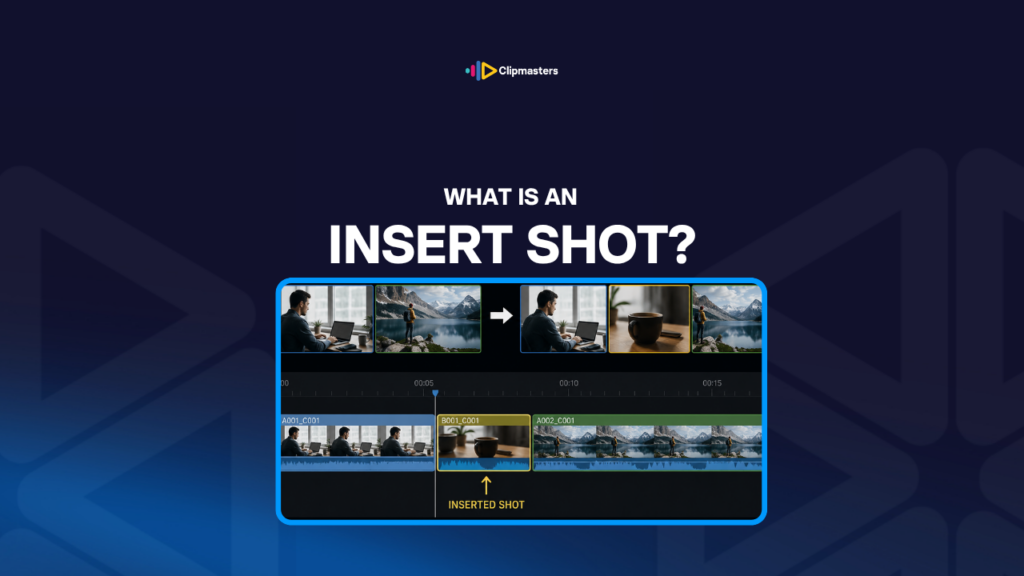
An insert shot is a tight, close-up shot of one specific detail in a scene. Where a wide shot shows the whole action, an insert zooms in on something small: a hand pressing a button, a face reacting, a phone screen showing a message, a clock ticking.
Here is what makes a shot an insert:
Common kinds of insert shots:
Inserts are technically different from “cutaways,” though people use the words loosely. A cutaway can be any shot that breaks from the main action. An insert is specifically a close-up detail within the same scene. In practice, the two overlap.
In editing, inserts are usually shot on their own, separate from the main action. The director plans for them, and the camera catches them in their own takes.
Here are a few reasons inserts get used constantly in commercial and narrative editing.
They direct attention. A wide shot cannot highlight one element. An insert says “look at this, this matters.” It pulls the viewer’s eye in a way the wide shot cannot.
They deliver information. A character reading a message is just one shot in the wide, and the message itself stays invisible. An insert of the screen lets the viewer read it.
They add variety. Cutting between wide shots alone gets monotonous. Inserting close-ups breaks up the rhythm and keeps the eye engaged.
They hide editing problems. An insert cutaway can cover a cut between two takes that do not quite match. The viewer sees the insert, then returns to the action, and the cut underneath stays invisible.
They compress time. Making coffee involves many small actions. Inserts of a few of them (pouring, stirring, sipping) can squeeze the whole sequence into a few seconds without losing the sense of it.
They emphasize emotion. A face insert at the right moment focuses the viewer on the reaction. The wide shot could not deliver that feeling as strongly.
They show the product. Commercial work uses inserts heavily for products. The wide scene gives the context, and the insert shows the product clearly enough to recognize.
They set the pace. Inserts naturally speed things up because they cut between focal points quickly. A scene that feels slow in wide shots feels faster with inserts added.
They tell two stories at once. A conversation in the wide shot, plus an insert of hands fidgeting under the table, tells you two things at the same time.
For commercial work, inserts are a foundation. Product shots, lifestyle videos, software demos, and almost every other format use them to direct attention and deliver information.
For narrative film and TV, inserts add depth and detail. A scene with no inserts feels theatrical, like a play on a wide stage. A scene with well-chosen inserts feels cinematic.
Here is the practical way inserts work in production and editing.
Plan them in pre-production. The shot list should include inserts. Work out which details need close-up coverage to support the scene. Without planning, inserts get forgotten on the day.
Shoot inserts on their own. Inserts are usually caught as separate takes, often after the main action is done. The crew can light the insert just for the close-up, lighting that might not work for the wide shot, and the actor can repeat the action precisely for the camera.
Match the lighting and color. Inserts shot in different conditions look wrong when cut into the main scene. The lighting, color, and exposure should match the wider footage.
Match the action. If the insert is meant to be from the same moment as the wide shot, the action has to line up. A hand position, an expression, an object’s spot should all be consistent.
Shoot a few takes. An insert shot only once gives the editor no options. A few takes provide choices for timing and performance.
Edit with restraint. Inserts work because they are selective. Cutting to an insert on every line feels frantic. Save them for moments that actually gain from the close-up.
Time them right. An insert held too long becomes its own little scene. Held too short, the viewer cannot take it in. Usually 1 to 3 seconds is right, depending on the content and pace.
Use inserts to set pace. More inserts speed up the cutting rhythm. Fewer slow it down. Inserts are a pacing tool.
Color match in post. Even with careful work on set, inserts often need a little extra color grading to blend into the scene.
Mind the audio. Inserts usually have little or no sound, since the action is quiet. The audio bed from the wider scene keeps playing underneath to hold the ambient continuity.
For most commercial work, planning and catching inserts adds 10 to 30% to shoot time, but it pays off in editing. Footage with rich insert coverage gives the editor much more to work with.
Here are a few habits that mark insert work as amateur.
No inserts at all. Scenes shot without insert coverage tie the editor’s hands. Cuts that should lean on an insert turn into awkward jumps, or have to borrow cutaways from other scenes.
Mismatched lighting. An insert clearly shot under different conditions than the scene. The viewer notices the difference.
Mismatched continuity. Hand positions, object placements, or expressions in the insert that do not match the wide shot. The viewer can tell when an insert does not belong.
Held too long. Insert shots that linger past their moment. A 5-second insert of a product feels like an ad break. Usually 1 to 3 seconds is enough.
Cut too short. Inserts that flash by faster than the viewer can take in. The detail does not land. Most useful inserts give the viewer enough time to see and process it.
Wrong framing. Inserts too tight to read, or too loose to count as a close-up. The framing should make the subject obvious.
Pointless inserts. Cutting to an insert that adds nothing. The viewer wonders why the close-up is there. Every insert should earn its place.
Inserts as crutches. Using an insert to hide an editing problem instead of fixing the cut underneath. Sometimes that is fine, but often it is a sign of weak coverage.
Forgetting to color match. Inserts that look visibly different in color from the rest of the footage. Color grading should bring them into line.
Repeating the same insert. Cutting to the same insert several times in one scene. The repetition gets obvious. Better to use a few different inserts that each add something.
For commercial work, the discipline is using inserts where they serve the content: product close-ups, hand details, screen captures, reaction faces. Each one earns its place by directing attention or delivering something the wide shot could not.
Insert shots are one of those production choices that shape how good the final edit can be. A scene with thorough insert coverage edits cleanly, while a scene without them leaves the editor stuck on wide shots that feel slow and theatrical. At Clipmasters, your editor will flag when incoming footage is missing inserts and tell you exactly what to grab next time, so your shoots come back with the coverage that makes for a polished, lively edit.
An insert is a close-up of a specific detail within the same scene as the main action. A cutaway can be any shot that breaks from the main action, often to something elsewhere. In practice the words overlap a lot. Inserts are really a subset of cutaways: close-ups within the scene.
Usually 1 to 3 seconds. Long enough for the viewer to see and take it in, short enough not to slow the scene. Longer inserts (3 to 5 seconds) are for content that takes time to read, like screen text or a longer action. Shorter ones (under a second) work for emotional emphasis or impressionistic moments.
Usually separately. Inserts shot on their own can be lit just for the close-up, with lighting that would not work in the wide shot, and the action can be performed slowly and precisely for the camera. Catching inserts during the main take is possible but usually gives you less control.
No. Some scenes work better in continuous wider shots, like long takes or scenes meant to feel slow. But most commercial work benefits from insert coverage. Product videos, software demos, lifestyle content, and any scene with objects or hands almost always need inserts.
Sometimes, by cropping into the wider shot. It works if the original footage is high enough resolution, like a 4K source cropped to a 1080p output. It does not work as well as a real insert, since the framing is forced rather than chosen. Use it as a fallback when proper inserts were not captured.