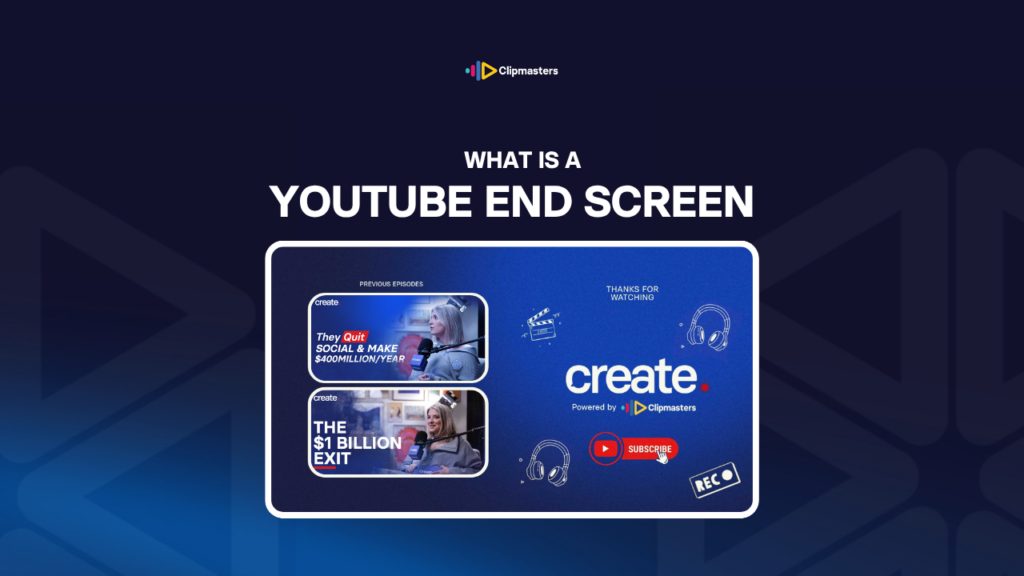
What Is a YouTube End Screen

A YouTube end screen is the final 5 to 20 seconds of a video, built to keep viewers engaged with subscribe buttons and videos.

In this article

Related Terms

Start Video editing now

What is a YouTube End Screen?

An end screen is the closing part of a YouTube video, built to keep viewers engaged. It runs in the last 5 to 20 seconds and includes clickable elements: subscribe buttons, previews of related videos, links to playlists, or outside links.

End screens are a specific YouTube feature:

  • Clickable elements. End screens use YouTube’s overlay system to place clickable items over the video.
  • A few element types. Subscribe buttons, video previews, playlist links, channel links, and approved website links.
  • A set window. End screens only appear in the last 5 to 20 seconds of a video.
  • YouTube only. End screens work only on YouTube. Other platforms have their own versions. Instagram and TikTok do not have end screens, and Vimeo uses different tools.
  • On desktop and mobile. Both show end screens, with a few differences in how they work.

During the end screen, the video usually:

  • Slows down. The last 20 seconds ease off to give viewers time to engage with the elements.
  • Points them out. A spoken call to action sends viewers to a specific element, like “subscribe here” or “watch this next.”
  • Uses a designed background. Many creators build a specific end-screen background that works with the clickable elements.
  • Plays outro music. Background music or sound that signals the video is wrapping up.
  • May feature the creator. Many creators speak to the audience during the end screen.

The common end-screen elements are:

  • Subscribe button. Invites viewers to subscribe to the channel.
  • Recommended videos. Suggests other videos from the channel to watch next.
  • Playlist. Links to a playlist of related content.
  • Approved outside links. Links to a related website, product, or service. These are only available to monetized channels in certain cases.

For YouTube creators and brands, end screens are key to growing a channel. The end screen is the moment when viewers who stuck around to the end get a nudge to do something more.

Need editors who optimize every video for engagement?

Editors matched to your brand. Turnaround in as little as 24 hours.

Why end screens matter

Here are a few reasons end screens matter so much on YouTube.

Retention drives the algorithm. When viewers move from one video to the next, it signals that the channel is worth watching. End screens make that jump easy.

More subscribers. The subscribe button turns engaged viewers, the ones who watched to the end, into subscribers. It is a direct path.

More videos watched. A viewer who watches several of your videos is worth more than one who watches just one. End screens encourage that.

Real actions. End-screen elements turn attention into clicks, subscriptions, and plays. And you can measure it.

An algorithm boost. Channels with high end-screen click-through often get shown to more people. The numbers matter.

A final brand moment. The end screen is the last impression. A strong one reinforces your brand right when people are most engaged.

Helping people find more. Recommended videos help viewers discover related content, which is a big deal for channels with a deep library.

Free space to use. End screens are free space the platform hands you. Skipping them throws that away.

Long-term value. End screens keep working long after a video goes up. Across many videos, that engagement adds up.

A base for growth. Channels that use strong end screens consistently grow faster than the ones that do not. The habit pays off.

For YouTube-focused business work, end screens are a must. For multi-platform work, the YouTube version should always have one, even if the other versions do not need it.

For YouTube creators, end screens are just part of the format. Audiences expect them.

How end screens are produced

Here is how end screens get made in practice.

Plan it before you film. The end screen is part of the video, not something you tack on later. Plan its length and content while you write the script.

Design the layout. End screens need a background that works with YouTube’s overlay system. Certain spots in the frame are reserved for the clickable elements, so design around them.

Leave room for the elements. YouTube places the clickable items in specific areas. Keep those areas fairly clear so the visuals do not fight the elements.

Tell people what to do. The video should point to the elements out loud: “Subscribe for more videos like this.” “Watch this next.” A direct ask raises the click-through.

Keep it on-brand. End screens should match your look. Brand colors, brand type, brand style. Doing this the same way every video reinforces who you are.

Include a subscribe ask. This is the most common element. Put it where people can see it, and draw attention to it.

Add one or two recommended videos. Specific picks beat a vague “watch more.” Recommend titles that relate to what the viewer just watched.

Add a playlist link if it fits. For channels with longer content, a playlist helps people go deeper.

Time it well. Most end screens run 10 to 20 seconds. Shorter feels rushed. Longer outstays its welcome.

Use outro music. Music that signals the video is ending. The switch to outro music tells viewers the main part is done and it is time to engage.

Set it up in YouTube Studio. After uploading, configure the end-screen elements in YouTube’s interface. Choose which videos appear, where the subscribe button goes, and so on.

Test it after publishing. Once it is live, check that the end screen works. The clickable elements should be in the right place and active.

For most YouTube-focused business work, end screens are part of standard production. Templates speed things up, and consistency reinforces the channel.

Common end screen mistakes

Here are a few things that go wrong with end screens.

No end screen at all. A YouTube video without one misses the chance to engage. Viewers leave without doing anything else.

Too long. A drawn-out end screen that drags past people’s patience. Keep it tight. Once the calls to action have landed, the video should end.

Too short. Under 5 seconds, YouTube does not have time to show the clickable elements properly. Aim for at least 5 seconds.

No ask. Showing the elements without pointing to them. Viewers may not notice. A spoken call to action lifts the click-through a lot.

Busy background. Visuals so busy they fight the subscribe button or the video previews. Design the background to support the elements.

The wrong recommendations. Suggesting videos unrelated to what the viewer just watched. The jump feels jarring. Recommend related content.

Inconsistent design. Different end-screen styles across videos from the same channel. It waters down recognition.

No subscribe button. Leaving out the subscribe button skips the most common conversion you can get.

Too many elements. Too many clickable items compete for attention. Two to four usually works best.

Weak outro music. Music that cuts off abruptly or does not fit the channel. Outro music should ease in and reinforce the brand.

Skipping it on long videos. Long content benefits from end screens the most, since more engaged viewers reach the end. Do not skip it there.

For business YouTube work, using end screens consistently is part of running a channel well. The habit drives growth.

How Clipmasters Uses This

End screens are free space the platform hands you, yet brands and creators often overlook them. Your Clipmasters editor can build an end screen into every YouTube video by default, with a consistent design, clear calls to action, and the right setup. Across many videos, that steady habit is what drives channel growth, and your editor handles it as part of the edit so you do not have to think about it.

Frequently asked questions

How long should an end screen be?

10 to 20 seconds is typical. Shorter, around 5 to 10 seconds, feels rushed and may not give viewers time to engage. Longer than 20 seconds outstays its welcome. The right length balances the chance to engage with a good viewer experience.

Can I have end screens on platforms other than YouTube?

Other platforms have their own features. Instagram has stickers and tags. TikTok has limited engagement tools in feed videos. Vimeo has overlay tools. The term "end screen" refers specifically to YouTube's feature. Other platforms handle it in their own, less standard ways.

How many elements should an end screen have?

Usually two to four. A subscribe button plus one or two recommended videos works for most channels. More than four starts to compete for attention and rarely converts well. With end screens, less is often more.

Should the end screen have music?

Yes, almost always. Outro music signals the shift from the main content to the engagement part. It should match the channel's feel. A hard music change can work for some content, but a smooth transition usually feels more polished.

Do end screens affect YouTube algorithm performance?

Indirectly, yes. End screens encourage people to watch more videos, and that is a positive signal for the algorithm. A strong end screen that leads to more plays improves the channel-level numbers the algorithm cares about.

Loading video…