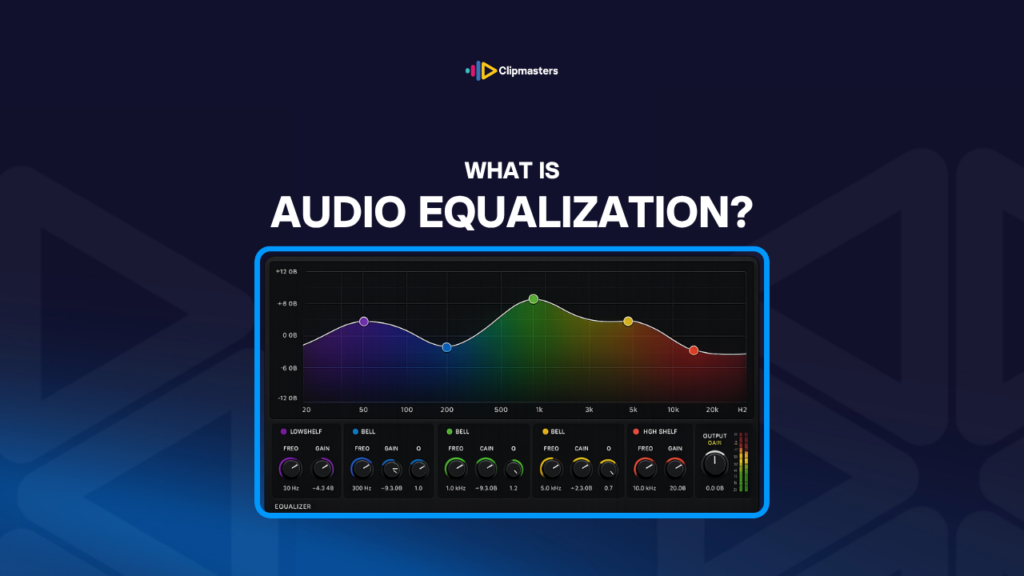
EQ, short for equalization, is how you adjust the balance of frequencies in a sound. Audio covers a wide range, from very low bass (around 20 Hz) up to very high treble (around 20 kHz). EQ lets you turn some of those frequency ranges up and others down, shaping the tone.
The key frequency ranges:
The common EQ controls:
The common EQ types:
The common EQ uses:
Here are a few reasons EQ is one of the basics of audio editing.
It makes dialogue clear. Dialogue often needs EQ to be easy to understand. Cutting the muddy low mids and adding a little presence makes the voice sound cleaner.
It keeps tone consistent. Different microphones and recording conditions give different tonal characters. EQ brings them into line so they match.
It creates space in the mix. EQ keeps dialogue and music from fighting. When each one has its own frequency space, they don’t compete.
It removes noise. Hum, buzz, and rumble sit at specific frequencies you can cut with EQ. That alone can clean up audio a lot.
It shapes your brand sound. Brands with a specific audio identity make consistent EQ choices. Part of how a brand sounds comes from EQ.
It helps across platforms. Different platforms compress audio differently. EQ can make up for some of those differences.
It compensates for speakers. Audio that sounds right on studio monitors can sound wrong on phones, laptops, and TVs. EQ helps tune it for the devices people actually use.
It’s a creative tool. A telephone effect, a radio voice, an underwater sound: these all come from EQ choices.
It removes room resonances. Rooms produce certain frequencies that color a recording. Cutting those cleans things up.
It adds warmth or brightness. A small bass boost adds warmth, a small treble boost adds brightness. Tiny EQ moves can shift the whole character.
For commercial work, EQ is part of every mixing pass. Cleaning dialogue, shaping music, and balancing the overall mix all involve EQ choices.
For audio post specialists, EQ is one of the core tools. Subtle EQ decisions are part of what separates a professional mix from an amateur one.
Here is how EQ works in practice.
Use EQ on each track. Each track (dialogue, music, effects) usually needs its own EQ. Different sources call for different treatment.
High-pass the dialogue first. Most dialogue benefits from a high-pass filter at 80 Hz, which removes low rumble that doesn’t help the voice anyway.
Cut the mud in the low mids. The 200 to 400 Hz range often makes dialogue sound muddy. Cutting 2 to 4 dB there usually cleans up the voice a lot.
Add presence for clarity. Adding 1 to 3 dB at 3 to 5 kHz makes the voice clearer and more present.
Tame harshness in the high mids. Some voices get harsh around 6 to 8 kHz. Cutting there softens the harshness without making the voice dull.
Shape the music for the mix. What the music needs depends on the track. Often it’s a small cut in the muddy range to leave room for dialogue, plus a small boost in the highs for sparkle.
Use surgical EQ for noise. Hum and buzz sit at exact frequencies. A narrow Q cut right on them removes the noise without touching the rest.
Keep EQ gentle. Most EQ moves should be a few dB. Heavy EQ (more than about 6 dB of cut or boost) often sounds processed and artificial.
Compare on and off. Toggle the EQ to check that it actually improves the sound. Without comparing, your changes can drift away from good.
Use a spectrum analyzer. A visual frequency display helps you spot problem frequencies your ears might miss.
EQ for the real playback device. Something that sounds good on studio monitors might not carry to phone speakers. Test on the kinds of devices people actually use.
Save your EQ presets. Brand-specific EQ choices can be saved and reused. Consistent EQ across content reinforces your brand sound.
For most commercial work, EQ is part of every mix. The exact moves depend on the source and the goal, but EQ is almost always involved.
Here are a few things that go wrong with EQ.
Too much EQ. Big cuts or boosts (10 dB or more) usually sound processed and fake. Gentle EQ, just a few dB, is usually better.
Boosting instead of cutting. Boosting adds energy, and it can pile up into harsh or distorted audio. Often it works better to cut the problem frequency than to boost the one you want.
The wrong EQ for the source. A heavy bass boost on a thin voice doesn’t add weight, it just sounds unnatural. EQ should support what’s already in the source, not invent what isn’t there.
EQ without listening. Adjusting EQ by watching the analyzer instead of hearing it. The visual helps, but it can’t replace your ears.
The same EQ on everything. A generic EQ applied without thinking about the source. Each voice, each music track, each sound has its own character.
Forgetting playback devices. EQ that sounds great on monitors but wrong on phones. Check across a few listening setups.
Too much high-pass. Cutting too much low end makes audio sound thin and unnatural. The high-pass should remove rumble, not the bass.
Treating sibilance with general EQ. Harsh “s” and “sh” sounds need de-essing, a specific tool. Using broad EQ for them often just makes the voice dull.
EQ that conflicts between tracks. Dialogue and music both boosted in the same range, fighting each other. EQ should create space, so each element gets its own range.
No comparison after changes. Working through EQ without A/B checking. Your changes drift away from the original. Toggle the EQ now and then to confirm it’s helping.
Heavy EQ to save bad source. EQ has limits. Badly recorded audio can’t always be rescued with EQ. Sometimes the real answer is to re-record.
For commercial work, careful EQ is part of professional mixing. Subtle, well-aimed EQ gives you clean audio. Heavy, unfocused EQ gives you audio that sounds processed.
EQ is one of the most powerful tools in mixing and one of the easiest to overdo. The temptation is to boost everything and cut everything else, which just leaves audio sounding unnatural. Your Clipmasters editor treats EQ as targeted surgery, making a few specific moves where they help and leaving the rest alone, so your audio sounds natural while clearly being cleaner than the raw source.
EQ is short for "equalization" (or "equalisation" in British spelling). It means adjusting the balance between the different frequencies in a sound. The term comes from audio engineering, where it first described making up for frequency differences in transmission equipment.
Parametric EQ gives you adjustable frequency, gain, and Q (bandwidth) on each band, so you get precise control. Graphic EQ has fixed frequency bands with sliders, so it's easy to read at a glance but less flexible. Parametric is more precise, while graphic is faster to scan.
Generally, cuts or boosts past 6 dB start to sound processed. Most professional EQ work uses subtle moves, around 1 to 4 dB. Heavy EQ (10 dB or more) usually means the source has bigger problems that EQ alone can't fully fix.
A few common moves: a high-pass filter at 80 Hz, a 2 to 3 dB cut around 250 to 400 Hz for mud, a 1 to 2 dB boost at 3 to 5 kHz for presence, and a gentle cut at 6 to 8 kHz if there's harshness. The exact numbers depend on the voice and the recording. Experiment within reason, and don't just apply a rigid template.
Both work, and the order changes the result. EQ first, then compression, means the compressor reacts to the EQ'd signal. Compression first, then EQ, means the EQ shapes the compressed signal. For most work, do light EQ first to clean things up, then compress, then refine with a little more EQ for polish.