AI Rotoscoping

AI rotoscoping uses machine learning to automatically isolate subjects from their backgrounds in video, creating masks frame by frame instead of drawing by hand.

In this article

Related Terms

Start Video editing now

What is AI Rotoscoping?

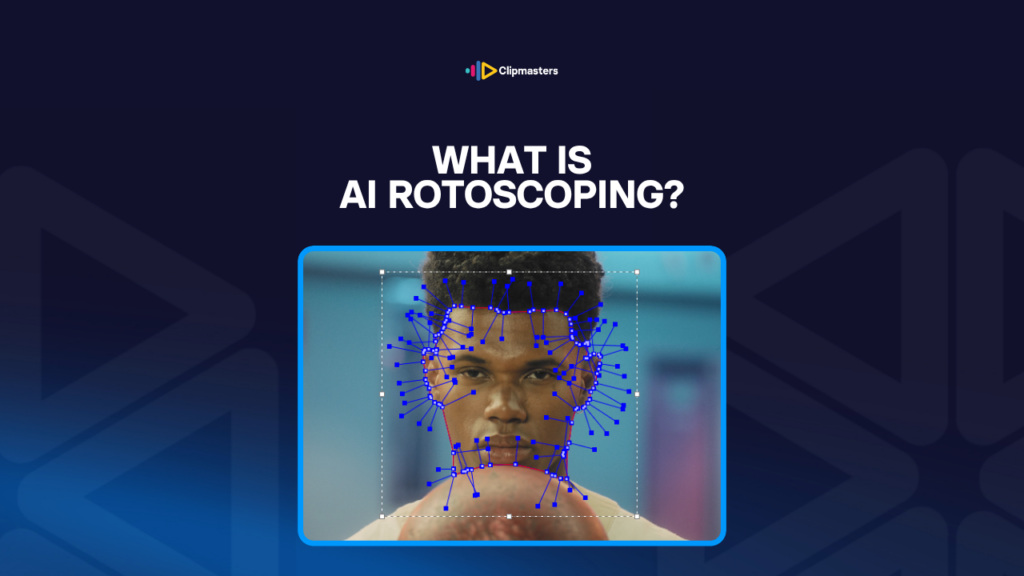
Rotoscoping means cutting a subject out from its background in video. Traditionally, you did it by hand, drawing a mask around the subject on every single frame. It is slow, patient work. A few seconds of footage can eat up hours of manual masking.

AI rotoscoping uses machine learning to do that job for you. The software spots the subject’s outline and draws the mask automatically. What used to take hours now takes minutes, or even seconds for a simple shot.

Here are the main AI rotoscoping tools as of 2026:

  • Adobe After Effects Roto Brush. Around since 2010 and much better with AI in recent versions. The industry standard for AI-assisted rotoscoping. It finds the subject’s edge and refines it across frames.
  • DaVinci Resolve Magic Mask. Built into Resolve. AI-powered subject detection and tracking that spreads the mask across frames on its own.
  • Runway ML. A cloud tool with AI rotoscoping among many other AI video features. Especially strong on tricky content like fine hair and complex motion.
  • Mocha Pro AI. A professional rotoscoping tool with AI features layered on top of its traditional tracking.
  • CapCut and similar mobile tools. Mobile-friendly AI rotoscoping for short-form social. Faster than desktop tools for simple subjects, but less precise on complex shots.

Under the hood, it is the same family of deep-learning models that handle image recognition and object detection elsewhere. The models have studied millions of images and videos where the subject’s outline was marked by hand, so they have learned the patterns that mark a subject’s edge.

Need editors who blend AI rotoscoping with manual cleanup?

Editors matched to your brand. Turnaround in as little as 24 hours.

What AI rotoscoping does well

AI rotoscoping has slashed the time and cost of this work for a lot of common situations.

Clear edges. A person against a contrasting background, a vehicle crossing the frame, a product on a clean surface. The AI handles these well, often with one click.

Moderate motion. Subjects walking, talking, or gesturing. Modern models track the edge across frames smoothly.

Decent lighting. Well-lit subjects with clear edges are easier for the AI than dim or low-contrast ones.

Steady backgrounds. It works better when the background stays fairly consistent. A subject against a clean wall is easier than the same subject in a busy crowd.

One subject. Isolating a single clear subject is easier than pulling apart several that overlap.

For these everyday cases, AI rotoscoping gives you in minutes what used to take hours by hand. That has put rotoscoping within reach of projects that could never have justified the cost before.

Here are the tasks where it has had the biggest impact:

  • Background replacement in commercial and online video. Talking-head content where the editor wants to swap in a brand-aligned background.
  • Selective colour grading. Giving the subject one look and the background another.
  • Object removal. Paired with generative fill, AI rotoscoping makes it quick to take unwanted things out of a shot.
  • Motion graphics. Lower-thirds and animated graphics that need to pass behind a subject. The AI makes the cut-out masks for you.
  • Reframing for vertical video. Tracking the subject across the frame so a vertical recrop follows them.

Where AI rotoscoping still struggles

For all the progress, AI rotoscoping has clear limits that affect professional work.

Fine hair. Strands of hair against a busy background are still hard. The AI often gives you a slightly blocky or smeared edge where hair meets background, so hair usually still needs a manual touch-up.

Motion blur. When a subject moves fast, the edge of the blur is soft and fuzzy. The AI can produce inconsistent masks across those blurred frames.

See-through stuff. Glass, water, smoke, and fabric confuse the basic “subject or background” choice that most AI rotoscoping makes.

Busy backgrounds. Subjects against cluttered backgrounds in a similar colour are harder than ones against clean, contrasting backgrounds. The AI sometimes mistakes part of the background for the subject.

Overlapping subjects. When subjects overlap, the AI has to decide where one ends and the next begins. Newer models do this better than old ones, but it is still tricky.

Edge details. Where the subject has fine detail at the edge, like fingers, accessories, or complex clothing, the mask sometimes simplifies the shape and misses bits a hand-drawn mask would catch.

Very fast motion. Extremely fast action like sports can leave the mask jumping around from frame to frame.

Unusual subjects. The models are trained on common things like people, vehicles, and products. Less common subjects, like animals in odd poses or abstract objects in strange light, can come out poorly.

For high-end effects work, AI rotoscoping is usually the starting point, not the finish. The AI gives you a rough mask quickly, then a person refines the edges, fixes the problem frames, and produces the final clean cut-out. That combined approach is faster than doing it all by hand and, for most uses, the result is impossible to tell apart from fully manual work.

AI rotoscoping in practical workflows

Here is how AI rotoscoping shows up across different kinds of production.

Commercial and online video. The standard tool for everyday masking: background replacement, selective grading, isolating a subject. Most professional commercial work in 2026 starts with AI rotoscoping by default.

Music videos and stylised content. Heavy use. Music videos often put stylised effects on subjects, like selective colour, glow, or motion trails, that all rely on rotoscoping. AI tools make these effects easy to reach.

Documentary and news. Increasingly used for cleanup, like removing unwanted things from interview backgrounds, and for blurring identifying details such as faces and license plates when someone needs to stay anonymous.

Social short-form. CapCut and similar mobile tools have made AI rotoscoping easy without desktop software. Background blur, sticker effects, and isolated-subject looks are now one-click features on phones.

Feature film effects. AI rotoscoping is part of the pipeline, but rarely the final result. Films use it for a first-pass mask, then refine by hand for the final quality. That combination has cut the cost of complex effects work a lot.

YouTube creators. Many creators use AI rotoscoping for effects: replacing the background during talking-head segments, or isolating themselves to put text or graphics behind them. Premiere Pro, DaVinci Resolve, and Runway are common choices.

Live streaming. Real-time AI rotoscoping for virtual backgrounds in Zoom, OBS, and similar tools. The quality is lower than the offline kind, since it has to work live, but it is fine for casual use.

For most professional commercial and online video, AI rotoscoping has gone from a specialised feature to a default tool. Workflows that do not use it for routine masking are getting rare.

How Clipmasters Uses This

AI rotoscoping is one of the bigger leaps in editing tech in recent years. Work that used to take a dedicated artist hours per clip can now be done in minutes. At Clipmasters, your editor uses the AI for the first pass and cleans up the edges, problem frames, and fine details by hand, so you get results that would have needed a specialist effects artist a few years ago, in a fraction of the time.

Frequently asked questions

How is AI rotoscoping different from manual rotoscoping?

Manual rotoscoping means hand-drawing a mask on every frame, or every few frames with the software filling in between. AI rotoscoping spots the subject automatically. The AI version is dramatically faster, minutes instead of hours for a typical shot, but it is sometimes less precise on tricky content like fine hair, motion blur, and busy backgrounds. Most professional workflows now combine the two: AI for the first pass, human for the cleanup.

Which tool is best for AI rotoscoping?

After Effects' Roto Brush is the longest-established and most widely supported. DaVinci Resolve's Magic Mask is excellent and free in the standard version. Runway ML shines on tricky content like complex motion and fine detail. For mobile, CapCut handles AI rotoscoping for short-form social. Pick based on your existing workflow and how complex the content is.

Can AI rotoscoping handle fine hair?

Better than older AI versions, but not perfectly. Fine hair against a busy background is still one of the hardest cases. The result is usually a slightly simplified or blocky hair edge. For high-end work, a manual touch-up of the hair is still common. For most everyday needs, the AI result is good enough.

Does AI rotoscoping work for real-time effects?

Yes, for casual use. Zoom's virtual backgrounds, OBS Studio's camera filters, and Snapchat lenses all use real-time AI rotoscoping. The live version is lower quality than the offline kind, since it has to keep up with live video, but it is fine for most casual uses. Professional virtual production for film and TV uses more advanced real-time tools.

Will AI rotoscoping replace manual rotoscoping entirely?

For routine work, it mostly already has. Background replacements, simple object isolation, and basic compositing increasingly use AI tools by default. For high-end effects work, like feature-film quality, complex shots, and difficult edges, manual rotoscoping is still part of the job. The combined approach, AI first pass plus manual refinement, is the practical norm in 2026.

Loading video…